Air traffic control for your AI agents
Map every agent, model and tool call across your environment. Gate the risky ones, hold them for a human, and see what each agent costs — enforced at the gateway, not just observed.
Self-hosted · one Docker command · Apache-2.0
Agents now hop between models, tool servers and your data. Control Tower puts every hop on one live map, then lets you gate, approve and account for each call before it runs.
Airspace: every agentic data flow, on one map.
Each API key is an agent. Each model, MCP server and outside system it touches is a station. Lines show who talks to whom right now, and the map documents itself as traffic flows.
- Live map of agents, models and tools, laid out like a transit map so busy estates stay readable.
- Traffic that bypasses the gateway shows up too, reported by your SDK or OpenTelemetry and drawn dashed: seen, not enforced.
- Hover to trace one agent's routes; filter to active, gateway or outside traffic.
- Export the estate as an image, or a Markdown or CSV data-flow inventory for your reviewers.
| Agent | Reaches | Policy |
|---|---|---|
| support-triage | salesforce › delete_contact | approval |
| pr-reviewer | claude-sonnet-4-5 | allow |
| pr-reviewer | github › merge_pr | deny |
| incident-copilot | orders (postgres) | not enforced |
| market-research | api.openai.com | bypasses |
| support-triage | gpt-4.1-mini | inspect |
| System | Called by | Status |
|---|---|---|
| OpenAIapi.openai.com | market-research | bypasses gateway |
| GitHubapi.github.com | pr-reviewer, incident-copilot | observed |
| orderspostgresql · orders-db | incident-copilot | observed |
| HubSpotapi.hubapi.com | outbound-sdr, support-triage | observed |
Reported with one call to /v1/observe, or any OpenTelemetry exporter pointed at /v1/traces.
Gates: decide at the boundary, before the call runs.
Click a line or a tool on the map and set a gate. Because Control Tower is in the path, a gate is enforced, not a suggestion — and you can replay it against yesterday's traffic before you publish.
- Allow, deny, require approval, allow with limits or inspect — per agent, team, model, MCP tool or HTTP route.
- Tools an agent may not use are never listed to it, so there is nothing to talk its way around.
- Simulate on real traffic: see what a draft gate would have blocked, held or saved in the last 24 hours.
- Inspection scans prompts and tool arguments for PII, secrets and prompt injection, then flags, redacts or blocks.
- Your own guardrails too: Presidio, Lakera Guard, Bedrock Guardrails, Azure AI Content Safety, OpenAI moderation, or a URL of your own.
Nothing is published until you press Publish. Simulation never touches live traffic.
| Detector | Action | Matches |
|---|---|---|
| Personal dataemails, phone numbers, card numbers | redact | 14 |
| Secretscloud keys, API tokens, private keys | block | 2 |
| Prompt injection"ignore previous instructions" and friends | flag | 5 |
| Custom patterninternal project code names | flag | 0 |
Tower: a human in the loop, without breaking the agent.
A gated call holds at the gate while someone decides. Approve it in the console or straight from the alert in Slack; the agent carries on. If nobody answers in time, the agent gets a ticket it can redeem once approved.
- See the real arguments and a plain-language scope — "this one contact", not "all Salesforce writes".
- Approvals bind to what was approved, so an agent can't swap the arguments after you say yes.
- Retries collapse into one card instead of forty, and each approval is redeemed at most once.
- Alerts deep-link to the card from Slack or any signed webhook.
{ "contact_id": "c_8812",
  "reason": "duplicate of c_8790" }

Monitor: spend, errors and latency, by agent.
Every flight is recorded with tokens, cost, latency and outcome. Budgets and rate limits live on each agent's key, and alerts tell you when a gate fires or something drifts.
- Cost per agent, team, model and tool, priced from a maintained model price table.
- Budgets and rate limits per key that stop a runaway loop before it runs up the bill.
- Alerts on gates, errors, latency, health and budgets, to Slack or signed webhooks, with digests instead of floods.
- Spend by customer and by tag, with budgets and blocking per customer.
- Every call exported to OpenTelemetry (inside your agents' own traces), Datadog, Splunk or S3 — metadata only, never prompts.
- Prometheus
/metricsfor the dashboards you already run.
| When | Notify | Last fired |
|---|---|---|
| Any gate holds a calldeep-links to the approval card | #ops-approvals | 2 m ago |
| Error rate > 5% for 5 minper agent | webhook | yesterday |
| p95 latency > 8 sper model | #platform | — |
| Budget 80% usedonce per period | #finops | 3 d ago |
# HELP ct_flights_total Requests through the gateway.
ct_flights_total{kind="llm",outcome="ok"} 18234
ct_flights_total{kind="mcp",outcome="denied"} 37
ct_flights_total{kind="mcp",outcome="ticketed"} 12
# HELP ct_cost_usd_total Spend by team.
ct_cost_usd_total{team="support"} 412.08
ct_cost_usd_total{team="engineering"} 318.40
# HELP ct_approvals_pending Calls held at a gate.
ct_approvals_pending 1
Every model API, routed where it may go.
Chat is only part of what agents send. The rest goes through the same keys, gates, budgets and map.
Images, audio and providers' own SDKs
Image generation and edits, speech, transcription, moderation, rerank and completions — billed per image, second or search — and agents built on Google's Gen AI SDK or the AWS SDKs reach Gemini and Bedrock through Control Tower too.
Routing that keeps data where it belongs
Keys held to regions, deployments reserved for tags, retries and fallback models when a prompt is too long or a provider refuses, per-deployment limits, health checks, and opt-in caching — all behind the same gates.
Runs as one instance, or several
SQLite in one container to start; Postgres and Redis behind a load balancer when you need more, with rate limits, budgets and approvals shared across instances.
People with the right access
Admins change anything, approvers decide held calls, viewers see everything — enforced by the server, with one-time passwords for new people.
Solid lines are enforced. Dashed lines are only seen.
A security map is only useful if it doesn't overstate what it controls. Control Tower draws the difference, so you always know which calls a gate can actually stop.
Enforced — through the gateway
Model calls to /v1, tool calls to /mcp and API calls to /http pass through Control Tower. Gates, approvals, budgets and inspection apply to every one.
Observed — reported, not controlled
Calls your agents make directly, reported by SDK or OpenTelemetry. They are mapped and documented, and each one comes with steps to bring it inside.
Thirty seconds in the real console.
No mock-ups: this is Control Tower with its demo fleet. An agent is traced across the map, a gate is dragged onto its path to a Salesforce tool, and the next call waits at the gate until a human approves it.
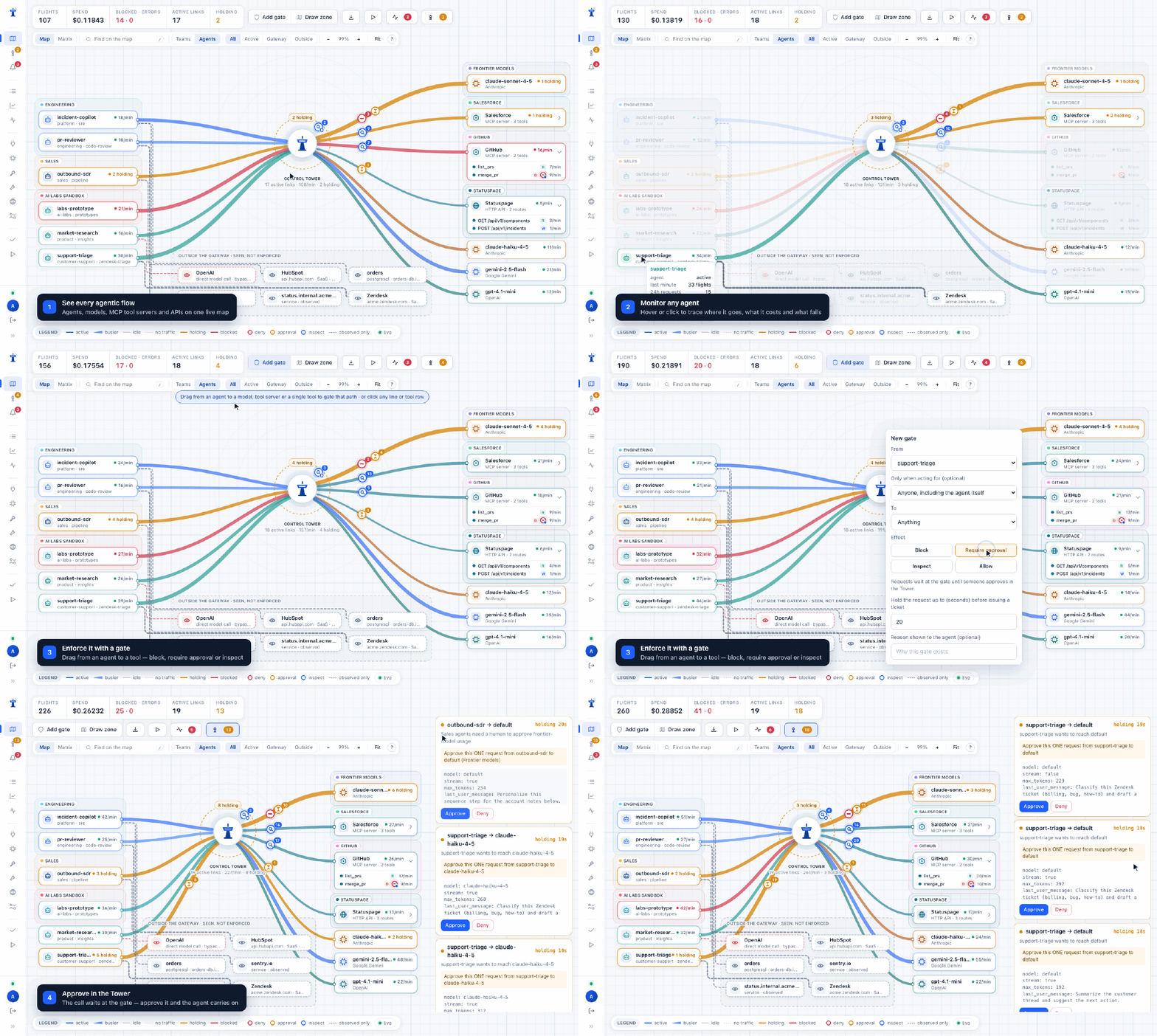
- See every flowAgents, models, tool servers and APIs, live.
- Trace an agentWhere it goes, what it costs, what fails.
- Draw a gateBlock, require approval or inspect a path.
- Approve the callIt waits at the gate; a human says yes.
Up and running in one command.
One container, SQLite by default, everything configured in the browser — a Get started guide takes you from an empty install to your own agent on the map. Prefer a platform? Deploy to Render in one click, run it on Kubernetes with the Helm chart, or see Fly.io, Railway and Compose. Every image is signed. Every step, with screenshots: the Getting started guide.
- Run the containerthen open
localhost:4000and set the admin password. - Connect a provider and create a key per agentthe console gives copy-paste setup for your SDK and confirms when the agent connects.
- Point your agents at Control Towerusually two environment variables — models are added the first time they're used.
Put every agent
on the map.
Self-host it today. Your prompts, keys and traffic never leave your infrastructure.