 Control Tower
 Agent identity: tokens instead of keys
Enterprise: JWT authentication for agents needs a Control Tower Enterprise license.
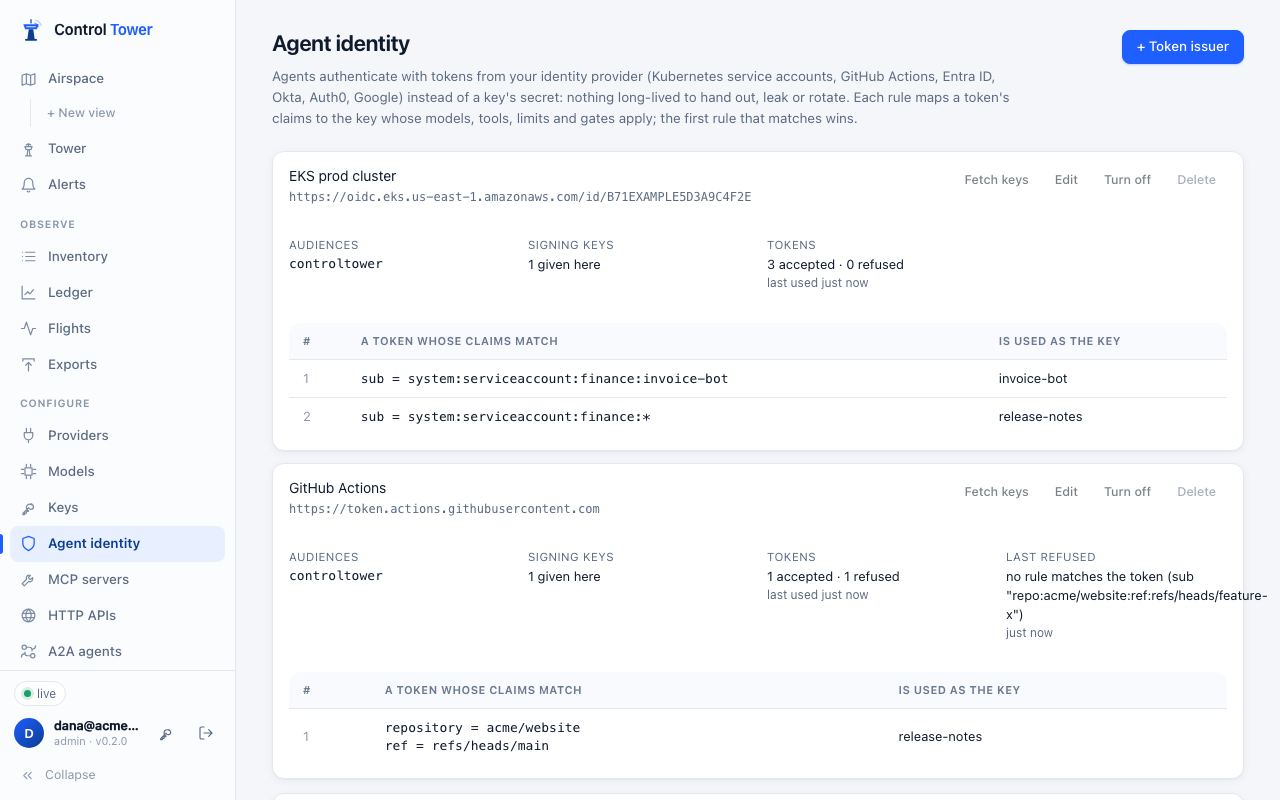
An agent can authenticate with a token from your identity provider instead of a key's secret: a Kubernetes service account token, a GitHub Actions OIDC token, or a client-credentials token from Microsoft Entra ID, Okta, Auth0 or Google. Nothing long-lived is handed out, so there's nothing to leak or rotate. The token names the workload, and your identity provider already controls who gets one.
You tell Control Tower which issuers to trust. Each issuer has rules that map a token's claims to a key. The first rule that matches wins, and the call is then made as that key, with its models, tools, limits, budgets and gates. Each call also records who presented the token, for example EKS prod cluster · system:serviceaccount:finance:invoice-bot.
What a token must be
A token is accepted only when all of these hold:
| Check | |
|---|---|
| Signed by the issuer | With one of the issuer's published keys, using an asymmetric algorithm (RS256/384/512, PS256/384/512, ES256/384/512, EdDSA). Unsigned tokens (alg: none) and shared-secret algorithms (HS256…) are refused |
| From that issuer | Its iss is exactly the issuer set up |
| Meant for Control Tower | Its aud includes one of the audiences you accept. Without this, a token your identity provider issued for another service could be replayed here, so an audience is required |
| Current | It has an exp and hasn't expired, and isn't before its nbf. Clocks may differ by up to 60 seconds |
| Short-lived | Its lifetime (exp − iat) is no longer than the issuer's limit (24 hours unless you set another) |
| Matched by a rule | Its claims match one of the issuer's rules, and the key that rule names exists and is enabled |
A token is checked once, then remembered until it expires, so a call costs a lookup, not a signature check. Changing an issuer or its rules applies at once: every token is checked again.
The signing keys come from the issuer's OpenID configuration (<issuer>/.well-known/openid-configuration, which must name the same issuer), from a JWKS URL, or can be pasted in for issuers Control Tower can't reach (air-gapped installs, a cluster's internal issuer). Fetched keys are refreshed every 10 minutes, and at once (at most every 30 seconds) when a token names a key not seen yet, so key rotation at the issuer just works. Only public keys are accepted: a JWKS containing a private key is refused.
Set it up
Create a key for each agent, with the models, tools, limits and budget it should have. Its secret doesn't need to leave Control Tower.
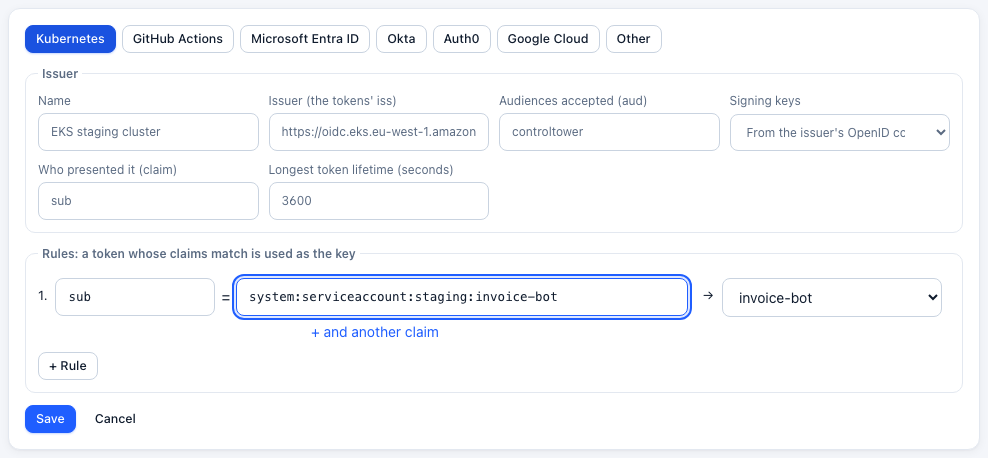
Open Agent identity and add a token issuer. Choose where tokens come from (Kubernetes, GitHub Actions, Microsoft Entra ID, Okta, Auth0, Google Cloud, or Other). Then fill in:
- Issuer: the tokens'
iss. - Audiences accepted: the
audyour agents will ask for, for examplecontroltower. - Signing keys.
- Rules: which claims, matching what, make a token which key.
*matches any characters. A claim that is a list (such asgroupsorroles) matches when any of its values does. Dots reach into nested claims (kubernetes.io.namespace).
- Issuer: the tokens'
Fetch keys checks that Control Tower can get the issuer's signing keys.
Try a token: paste one of your agent's tokens to see which key it would be used as, or exactly why it would be refused. It isn't stored.

Point the agent at Control Tower with the token where the key would go (see sending the token).
The issuer's card shows how many tokens were accepted and refused, and the reason for the last refusal. That makes a wrong audience or an unmatched rule easy to spot.
Tokens only
Once an agent uses tokens, stop its key's secret from working: on Keys, refuse the secret (or PATCH /admin/api/keys/:id {"tokens_only": true}). A leaked secret is then useless. Allow the secret turns it back on.
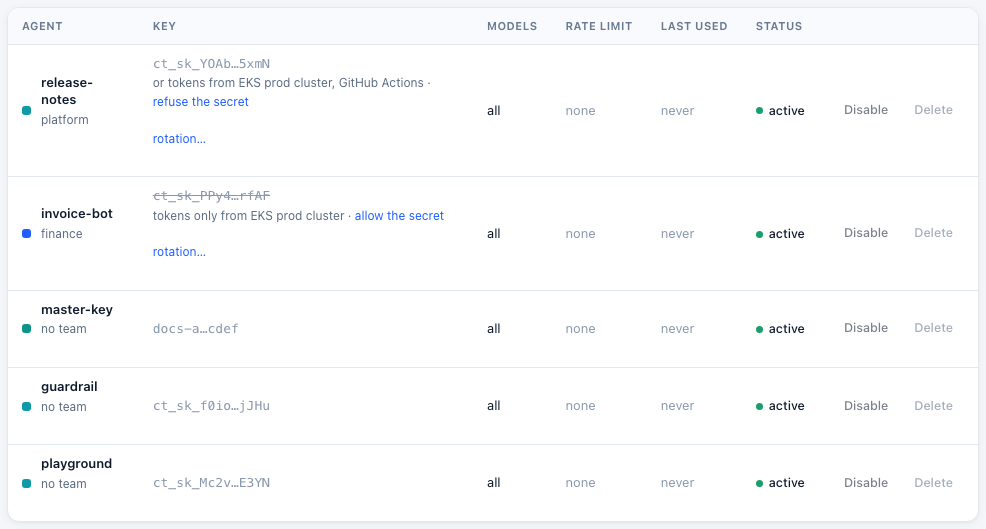
If tokens can't be used at all (every issuer is turned off, or the license has ended), tokens-only keys take their secret again, so no agent is locked out.
Where tokens come from
Kubernetes
Give the pod a projected service account token for Control Tower's audience:
spec:
  serviceAccountName: invoice-bot
  containers:
    - name: agent
      volumeMounts: [{ name: ct-token, mountPath: /var/run/secrets/controltower }]
  volumes:
    - name: ct-token
      projected:
        sources:
          - serviceAccountToken: { path: token, audience: controltower, expirationSeconds: 3600 }
Kubernetes rotates the file before it expires; read it for each call (or when a call is refused). The token's sub is system:serviceaccount:<namespace>:<name>:
| Claim | Pattern | |
|---|---|---|
sub | system:serviceaccount:finance:invoice-bot | one service account |
sub | system:serviceaccount:finance:* | any in the namespace |
Issuer: EKS, GKE and AKS publish one (https://oidc.eks.<region>.amazonaws.com/id/<id>, https://container.googleapis.com/v1/projects/<project>/locations/<location>/clusters/<cluster>, the AKS OIDC issuer URL), and Control Tower finds its keys. For a cluster whose issuer isn't reachable, paste its keys from kubectl get --raw /openid/v1/jwks, with the issuer from kubectl get --raw /.well-known/openid-configuration.
GitHub Actions
Request a token for Control Tower's audience in the workflow:
permissions:
  id-token: write
steps:
  - run: |
      CT_TOKEN=$(curl -s -H "Authorization: bearer $ACTIONS_ID_TOKEN_REQUEST_TOKEN" \
        "$ACTIONS_ID_TOKEN_REQUEST_URL&audience=controltower" | jq -r .value)
      echo "::add-mask::$CT_TOKEN"
      echo "CT_TOKEN=$CT_TOKEN" >> "$GITHUB_ENV"
Issuer: https://token.actions.githubusercontent.com. Useful claims: repository (acme/website), ref (refs/heads/main), environment, job_workflow_ref, repository_owner. Match more than the repository: a rule on repository alone accepts any branch, including a pull request's.
Microsoft Entra ID
Register an application for Control Tower that exposes an API (Application ID URI, e.g. api://controltower), with "accessTokenAcceptedVersion": 2 in its manifest. Each agent is an application that gets a token for api://controltower/.default with the client-credentials flow, or through a managed identity.
- Issuer:
https://login.microsoftonline.com/<tenant-id>/v2.0 - Audience: the application's client ID (v2 tokens carry the client ID as
aud). - Rules: on
azp(the calling application's client ID), or onrolesif you assign app roles.
Okta
Use a custom authorization server with an audience such as api://controltower. Each agent is an API services application using the client-credentials flow.
- Issuer:
https://<your-org>.okta.com/oauth2/<authorization server id> - Rules: on
cid(the client ID), orscpfor a scope.
Auth0
Create an API with identifier https://controltower.acme.com. Each agent is a machine-to-machine application.
- Issuer:
https://<tenant>.<region>.auth0.com/(with the trailing slash). - Rules: on
azp(the client ID), orsub(<client id>@clients).
Google Cloud
A workload with a service account gets an ID token from the metadata server, for the audience you choose:
curl -s -H "Metadata-Flavor: Google" \
"http://metadata/computeMetadata/v1/instance/service-accounts/default/identity?audience=https://controltower.acme.com&format=full"- Issuer:
https://accounts.google.com - Rules: on
email(the service account;format=fullputs it in the token), and set Who presented it toemail.
Sending the token
Wherever a key goes, a token can go instead:
- Model APIs (
/v1/…, Anthropic's/v1/messages, …):Authorization: Bearer <token>, orx-api-key. In an SDK, use the token as the API key, for exampleOpenAI(base_url=".../v1", api_key=token). - MCP (
/mcp):Authorization: Bearer <token>. - HTTP APIs (
/http/<api>/…):x-ct-key: <token>, becauseAuthorizationthere belongs to the API. - A2A agents:
Authorization: Bearer <token>.
Tokens expire. Refresh them the way your platform does (Kubernetes rewrites the file; your identity provider's SDK renews client-credentials tokens), and pass the current one with each call or new client. A refused token gets 401, as a wrong key would.
What's recorded
- Flights show who presented the token under the agent (token: EKS prod cluster · system:serviceaccount:finance:invoice-bot), and search finds it.
- Exports carry it as
principal. - The audit log records changes to issuers and rules. Tokens pasted into Try a token are never recorded.
The value comes from the sub claim unless you choose another under Who presented it (for example email).
Limits
- A token can't be revoked before it expires. To stop one sooner, turn the issuer off, change the rule, or disable the key. Keep lifetimes short: an hour or less is typical.
- Shared-secret (HS256) tokens aren't accepted. Use an issuer with published asymmetric keys.
- Without a license, or once one ends after its grace period, tokens are refused and keys' secrets work again.
API
Admins only.
| Method | Path | |
|---|---|---|
| GET | /admin/api/token-issuers | Issuers, with their rules (and each rule's key name), key status, and tokens accepted and refused |
| POST | /admin/api/token-issuers | {name, issuer, audiences, rules, jwks_uri?, jwks?, principal_claim?, max_lifetime_s?} |
| PATCH | /admin/api/token-issuers/:id | Any of the above, and enabled |
| DELETE | /admin/api/token-issuers/:id | |
| POST | /admin/api/token-issuers/:id/test | Fetch the issuer's signing keys now |
| POST | /admin/api/token-issuers/check | {token}: {ok: true, key, principal, expires_at} or {ok: false, reason} |
A rule is {"claims": {"sub": "system:serviceaccount:finance:*"}, "key_id": "…"}. Every claim listed must match. A rule must name at least one claim, and not only *.
curl -X POST https://controltower.example.com/admin/api/token-issuers \
  -H "authorization: Bearer $CT_ADMIN_KEY" -H 'content-type: application/json' \
  -d '{"name": "GitHub Actions", "issuer": "https://token.actions.githubusercontent.com",
       "audiences": ["controltower"], "max_lifetime_s": 3600,
       "rules": [{"claims": {"repository": "acme/website", "ref": "refs/heads/main"}, "key_id": "01J…"}]}'
Keys take tokens_only (true or false) on POST and PATCH /admin/api/keys. GET /admin/api/keys lists tokens_only and token_issuers, the issuers with a rule naming each key.