 Control Tower
 Demo mode
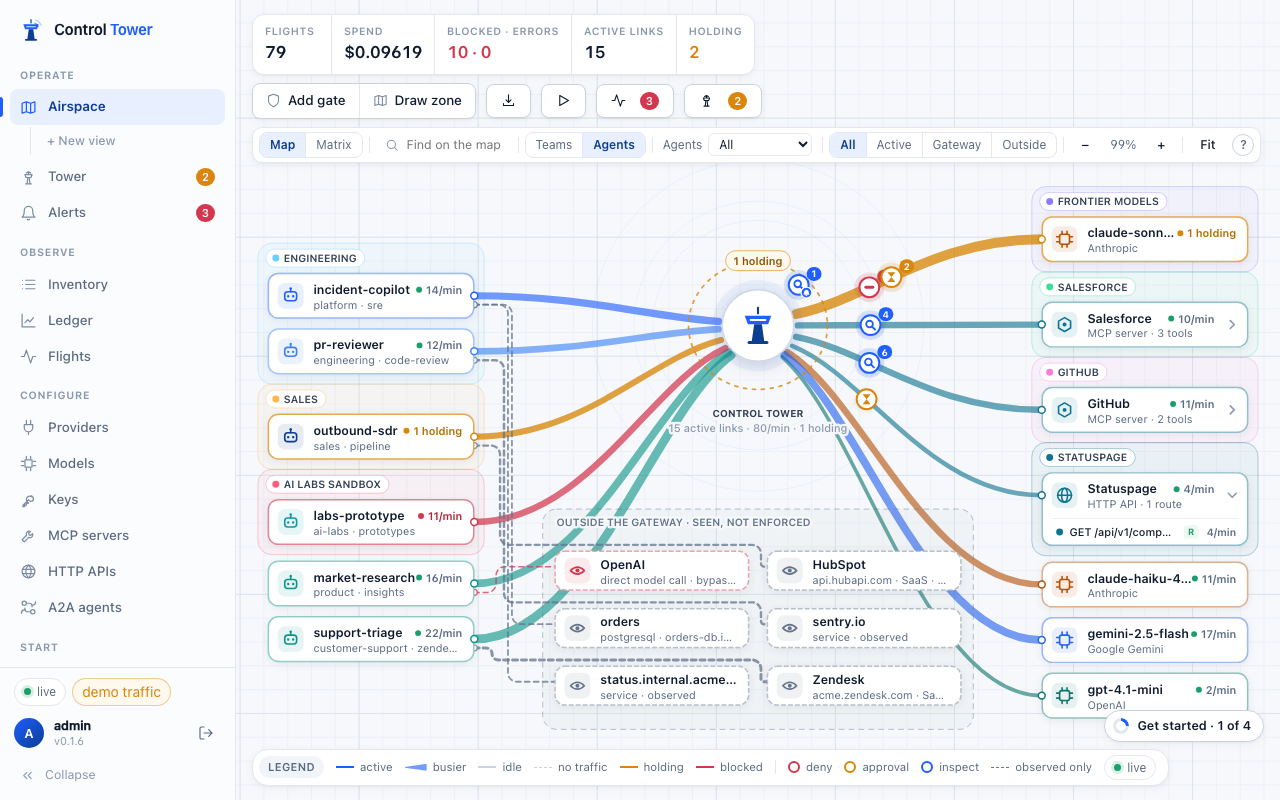
The demo fills the map with a synthetic fleet, so you can see gates, approvals, alerts and spend before connecting anything real.
- Start: Get started → Start the demo fleet, or
CT_DEMO=1at startup. - Stop: Stop demo and clear it removes every demo row — providers, models, keys, zones, gates, alerts and their traffic — and leaves your own setup alone.
What it runs
- Six agents —
support-triage,pr-reviewer,market-research,incident-copilot,outbound-sdr,labs-prototype— each with its own key, team and habits. - Stand-in providers named Anthropic, OpenAI and Google Gemini, serving
claude-sonnet-4-5,claude-haiku-4-5,gpt-4.1-miniandgemini-2.5-flash. They answer locally with realistic latency, streaming and the occasional rate limit (so fallbacks show), and are priced with the real price table. Nothing leaves your machine. - Tool servers Salesforce and GitHub (MCP) and a Statuspage HTTP API, running inside Control Tower.
- Zones, gates and alerts: the AI Labs sandbox may not merge pull requests, deleting a Salesforce contact needs approval, sales agents need approval for frontier models, secrets are blocked in anything agents send, and prompt injection in GitHub content is flagged.
- A demo approver decides held requests after about eight seconds if nobody clicks first, so the map keeps moving. Your own approval gates are never auto-approved.
Every demo call goes through the real pipeline over HTTP with the demo keys — the same auth, limits, gates, approvals, inspection and accounting as real traffic. Demo traffic is marked demo throughout the console.
Safety
Demo providers never adopt models on first use, and demo mode refuses to start if your setup already uses one of its model or tool names — so demo traffic can never reach a real provider or tool server.