 Control Tower
 Alerts
Hear about gates doing their job, providers going down, agents failing or slowing, and budgets running low — in the console, Slack, email, or any webhook. Alerts carry names and counts, never prompts, tool arguments or responses.
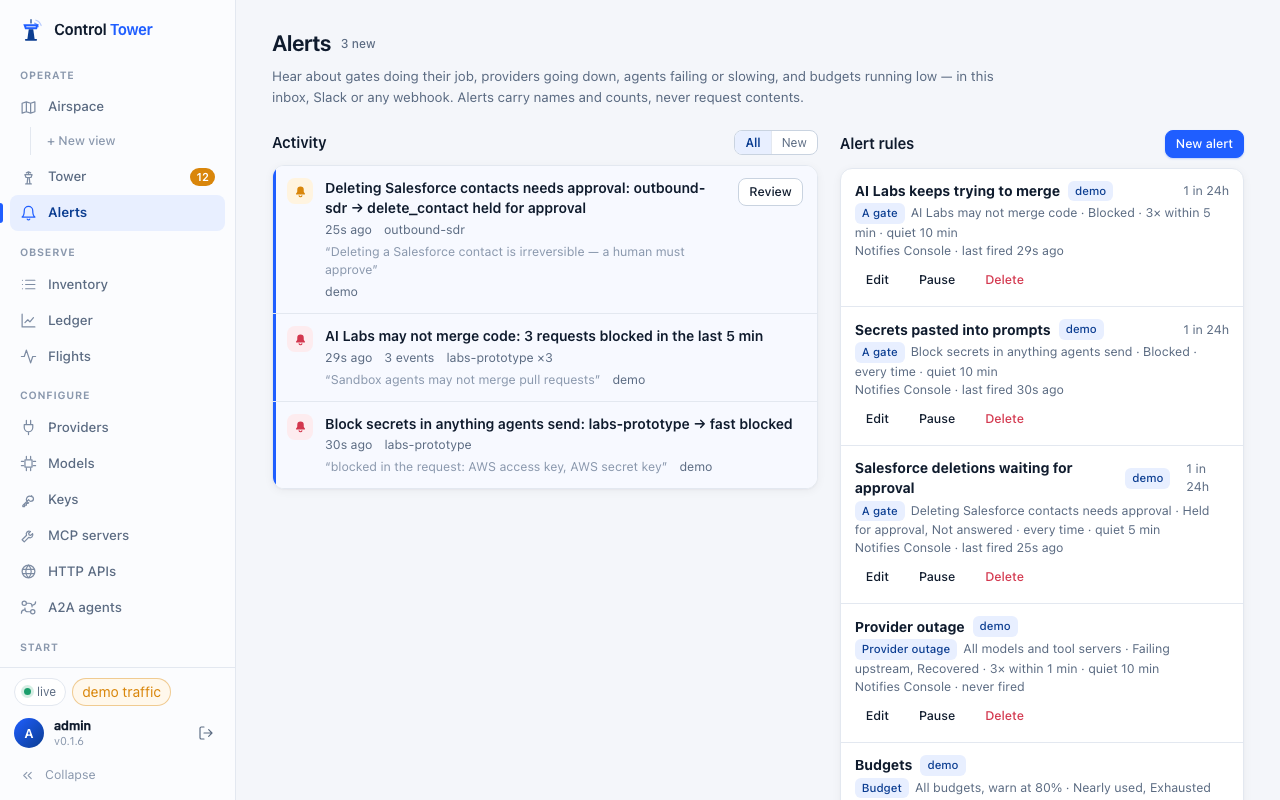
Create an alert
Three ways:
- tick Alert me when adding a gate on the Airspace,
- click an existing gate → Add alert,
- Alerts → New alert for anything else.
| Kind | Fires on |
|---|---|
| Gate | blocked, held, approved, rejected, unanswered (hold or approval expired), allowed, scope_mismatch (an approval redeemed with different arguments — a security event), masked / flagged (inspect gates) |
| Provider outage | outage: repeated timeouts, network errors or 5xx for a model or MCP server within a window (rate limits and 4xx don't count), or a model failing its background health check — even while nobody is calling it · recovered: the first success afterwards |
| Failed requests | Requests that still failed after fallbacks, optionally for chosen agents or models |
| Slow requests | Requests slower than a threshold (default 30 s) |
| Budget | A key, team or project budget reaching a percentage (default 80%) and being used up — once per budget period. Customer budgets don't raise alerts |
| Daily summary | Requests, tokens, spend, blocked / held / masked counts, errors, top spenders and the slowest and most-failing models, at a chosen hour (UTC); skipped on quiet days |
How often (gate alerts): Every time, or When it repeats — N times within M minutes. Failed requests, slow requests and outages set the same N within M minutes under Failures needed or Slow requests needed. After firing, a rule stays quiet for the time set in After an alert, stay quiet for and then sends one digest of what happened in the meantime — so a burst of 400 blocked calls is one message, not 400.
Channels
- Console — always: the inbox, a badge in the navigation, and live toasts.
- Slack — an incoming-webhook URL (Mattermost and Rocket.Chat work too).
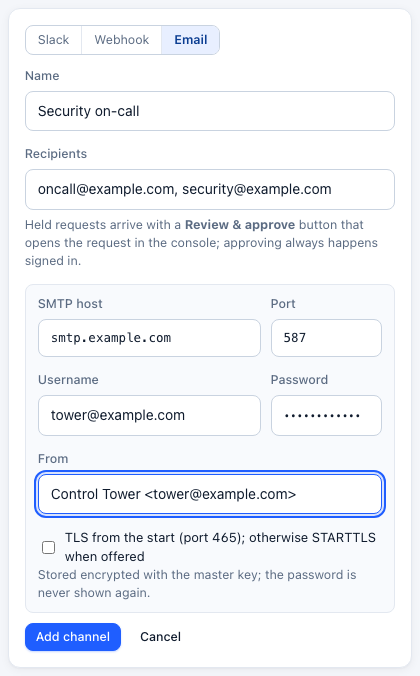
- Email — one or more recipients, through your SMTP server (set on the channel, or once for the server with
CT_SMTP_URL). - Webhook — any URL; add a signing secret to verify deliveries.
Channel URLs and secrets are encrypted at rest and never returned by the API. Set CT_PUBLIC_URL so links in messages point at your console (detected on Render, Fly.io and Railway); without it they use http://localhost:<port>, with the port the server listens on.
Approving by email
Add an Email channel and choose it on an alert for held — tick Alert me on an approval gate, or New alert on the Alerts page.
Each held request becomes an email marked Approval needed, with the agent, the target, the gate, its reason, the exact scope of the decision and a Review & approve button:
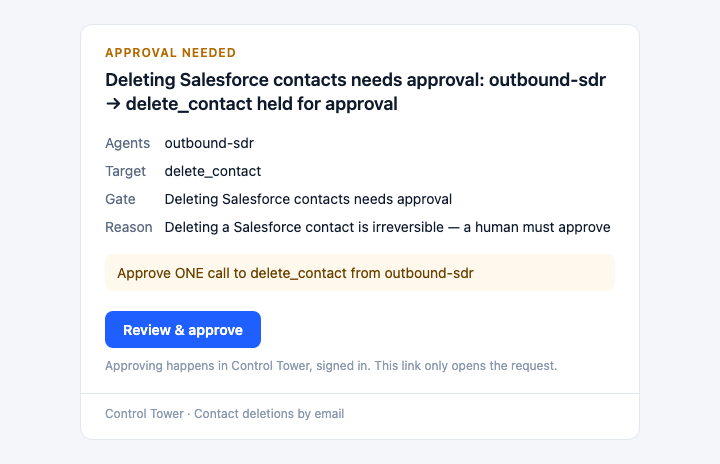
The button opens that request's card in the console. Approving is always done there, signed in — so a forwarded email, a mail gateway that follows links, or anyone else who sees the message can't approve anything. Like every alert, the email carries names and the scope of the decision, never the request's contents.
SMTP settings: host, port, optional username and password (stored encrypted, never shown again), the From address, and whether to use TLS from the start (port 465) — otherwise STARTTLS is used when the server offers it. To set them once for every email channel, start the server with CT_SMTP_URL=smtp://user:password@smtp.example.com:587 (or smtps://…:465) and CT_SMTP_FROM="Control Tower <tower@example.com>". Temporary SMTP failures (4xx, network) are retried; permanent ones (5xx) are reported on the channel.
Approving from Slack
A held alert about one request links straight to its approval card, with a Review & approve button in Slack and an approval: {id, scope, url} object in webhooks. The link only opens the card: approving is always an authenticated action in the console, so a link unfurler or a forwarded message can't approve anything.
Webhook payload
{
  "type": "controltower.alert",
  "id": "alert_…",
  "kind": "gate",
  "title": "Deleting Salesforce contacts needs approval: outbound-sdr → delete_contact held for approval",
  "trigger": "held",
  "count": 1,
  "digest": false,
  "window_s": 300,
  "first_at": "2026-09-25T14:02:11.000Z",
  "last_at": "2026-09-25T14:02:11.000Z",
  "alert_rule": { "id": "alr_…", "name": "Contact deletes" },
  "subject": { "kind": "gate", "id": "rule_…", "name": "Deleting Salesforce contacts needs approval" },
  "gate": { "id": "rule_…", "name": "Deleting Salesforce contacts needs approval", "effect": "require_approval" },
  "agents": [{ "name": "outbound-sdr", "count": 1 }],
  "destinations": [{ "name": "delete_contact", "count": 1 }],
  "reason": "Deletes need a human",
  "lines": [],
  "flights": ["01K…"],
  "approval": { "id": "apr_…", "scope": "Approve ONE call to delete_contact from outbound-sdr", "url": "https://tower.example.com/#/tower/apr_…" },
  "console_url": "https://tower.example.com/#/tower/apr_…"
}
console_url points at the page to act on: the request's card in the Tower for a single held request, the Tower queue for several, and otherwise the page for that kind of alert.
Each delivery carries x-ct-event: alert. With a signing secret, it also carries x-ct-signature: t=<unix seconds>,v1=<hex>, where v1 = HMAC-SHA256(secret, "<t>.<raw body>"). Deliveries are retried twice on network errors, 408, 429 and 5xx.
From the config file
general_settings.alerting: ["slack"] with SLACK_WEBHOOK_URL in the environment creates a Slack channel, and alert_types become rules: llm_exceptions → failed requests, llm_too_slow / llm_requests_hanging → slow requests, budget_alerts → budgets, cooldown_deployment / outage_alerts → provider outages, daily_reports / spend_reports → daily summary. See Config file.
API
POST /admin/api/alert-rules creates a rule; PATCH /admin/api/alert-rules/:id changes the fields it is sent.
{
  "name": "Contact deletes",
  "kind": "gate",
  "rule_id": "rule_…",
  "triggers": ["held", "scope_mismatch"],
  "threshold": 1,
  "window_s": 300,
  "cooldown_s": 300,
  "channels": ["ach_…"],
  "params": {}
}| Field | |
|---|---|
kind | gate, health (provider outage), errors (failed requests), latency (slow requests), budget or digest (daily summary). Default gate |
triggers | At least one of the kind's: gate — blocked, held, approved, rejected, unanswered, allowed, scope_mismatch, masked, flagged; health — outage, recovered; errors — failed; latency — slow; budget — budget_warning, budget_exceeded; digest — daily |
rule_id | For gate: the gate to watch. Leave it out for every gate |
threshold, window_s | Fire at threshold events within window_s seconds (defaults 1 and 300) |
cooldown_s | Quiet time after firing, then one digest (default 300) |
channels | Alert channel ids; the console inbox always gets it |
params.targets | For health, errors, latency and budget: only these deployments, MCP servers or keys (by id), or team:<name> / project:<name>. Empty is all |
params.slow_ms | For latency: what counts as slow (default 30000) |
params.warn_pct | For budget: the warning percentage (default 80) |
params.hour | For digest: the hour to send it, UTC (default 8) |
enabled | false pauses the rule |
POST /admin/api/alert-channels adds a channel: {kind: "slack" | "webhook", name?, url, secret?} (secret for webhooks), or {kind: "email", name?, to: [...], smtp?: {host, port, secure, user, pass, from}}.