 Control Tower
 SCIM provisioning
Enterprise: SCIM needs a Control Tower Enterprise license.
With SCIM 2.0, your identity provider manages who has access to the console:
- it adds people when they're assigned to the Control Tower app;
- it changes them (name, email);
- it deactivates them when they're unassigned or suspended;
- it removes them;
- it pushes groups whose names decide each person's role, and the teams they belong to.
It works with Microsoft Entra ID, Okta, OneLogin, JumpCloud, and any other SCIM 2.0 client. People sign in with single sign-on through the same provider.
Set it up
Add the identity provider under People → Single sign-on and provisioning (OIDC or SAML), with its role map. For example, admin groups
CT Admins, approver groupsCT Approvers, and Anyone else: Refused.Turn on provisioning. Control Tower shows the SCIM base URL (
https://<your console>/scim/v2) and a token, once. The token is stored only as a hash. New SCIM token replaces it; Revoke token turns provisioning off.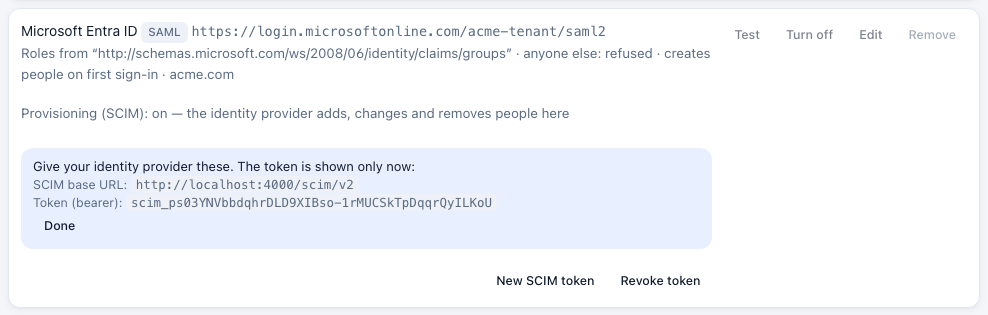
In the identity provider:
- Entra ID: Enterprise application → Provisioning → Automatic. Tenant URL: the SCIM base URL. Secret token: the token.
- Okta: App → Provisioning → Integration → SCIM connector base URL and the token as an HTTP header (Bearer). Unique identifier field:
userName. Enable Push New Users, Push Profile Updates, Push Groups and Deactivate Users.
Assign people and groups to the app, and push the groups.
What each change does
| At the identity provider | In Control Tower |
|---|---|
| Person assigned | Created, with the email as their sign-in. If an admin had already added them by email, the provider takes that account over |
| Added to a group | Their role becomes the highest one their groups map to, and their sessions end so the new role applies. A group that maps to nothing changes nothing |
| In no group that gives a role | Kept, but they can't sign in until a group gives them a role (with Anyone else set to a role, that role applies instead) |
| Group renamed | Everyone in it gets the role the new name maps to |
Deactivated or unassigned (active: false) | Signed out at once, and refused at sign-in, with password or single sign-on. Their account is kept, and joining a group doesn't bring them back |
| Reactivated | Back in, if their groups give them a role |
| Deleted | The account is removed |
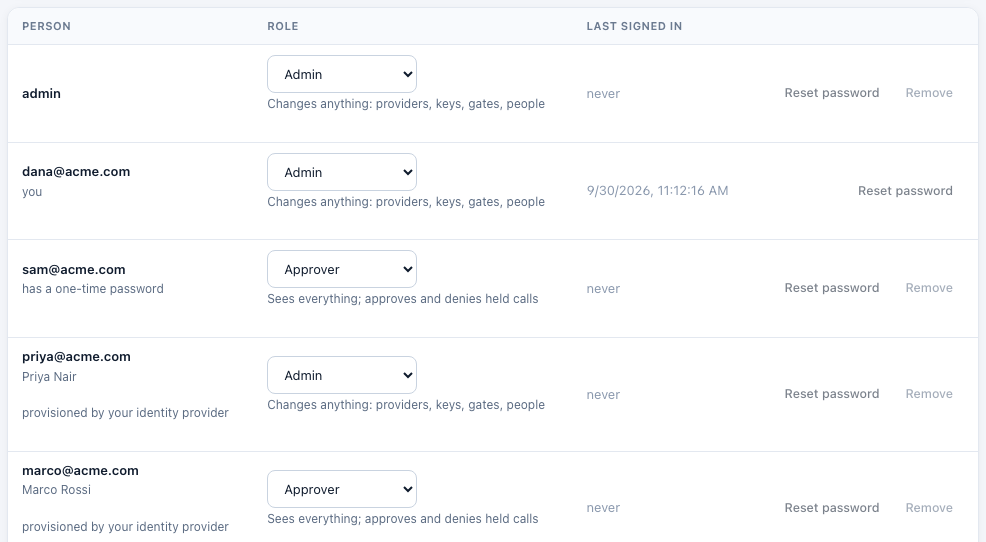
A provider sees and changes only the people and groups it provisioned. Looking someone up by userName also finds people an admin added by hand, so the provider can take them over. It never finds another provider's people. Roles for provisioned people come from SCIM groups. Groups in the ID token or SAML assertion don't override them.
Seats: provisioned people use the license's seats, the same as people who sign in with single sign-on. Provisioning past the seats is refused (403, scimType: seats). People with no role don't count.
Every change is in the audit log, made by scim:<provider name>.
What's supported
| Resources | /Users, /Groups, and /ServiceProviderConfig, /ResourceTypes, /Schemas |
| Operations | GET (with paging: startIndex, count), POST, PUT, PATCH, DELETE |
| Filters | attribute eq "value" on userName, externalId, id, emails.value (users) and displayName, externalId, id (groups) |
| PATCH | add, replace, remove in either case, with or without a path; active as a boolean or the strings "True"/"False"; group members by members, or one member with members[value eq "…"] |
| Kept | userName (the email), displayName or name, externalId, active, group names and members. Other attributes are accepted and ignored |
| Not supported | Bulk, sorting, ETags, changing passwords |
Errors use the SCIM error format, for example {"schemas": ["urn:ietf:params:scim:api:messages:2.0:Error"], "status": "409", "scimType": "uniqueness", "detail": "…"}.