 Control Tower
 Multi-region
Enterprise: several regions need a Control Tower Enterprise license on the control plane.
What you get:
- one control plane configures every region;
- regions keep serving through a control-plane outage;
- calls stay in their region;
- one console shows every region's calls, spend, map and held calls;
- rate limits, budgets and the yearly request count are global.
It's tested across three continents, with failure drills.
Run Control Tower close to your agents, in as many regions as you need, and configure it in one place:
- The control plane is the Control Tower you already run. It holds the configuration, the console, the audit log, the license and single sign-on. It can serve agents too.
- Each region is a Control Tower with its own database and Redis. It takes its configuration from the control plane and serves the agents near it. Their calls stay in the region: the flights, events, spend and held calls.
Your load balancer or DNS sends each agent to its region.
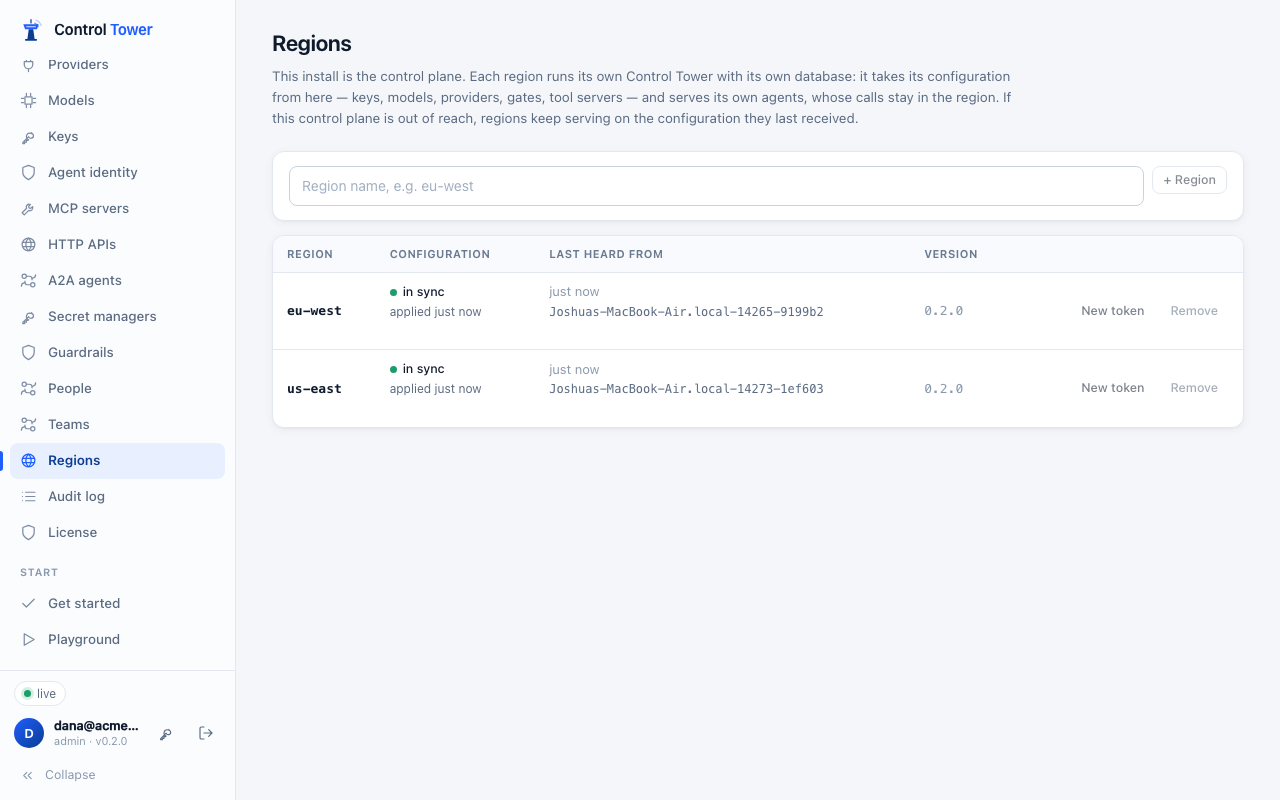
What a region takes from the control plane
Everything agents are served with:
- keys (hashes only; built-in keys stay each install's own);
- providers and their credentials;
- models and aliases;
- gates and zones;
- tool servers, HTTP APIs and A2A agents;
- guardrail services;
- exports;
- token issuers and secret managers;
- alert rules and channels;
- customers;
- budget limits;
- the license.
What a region measures itself stays its own: health checks, delivery counters, and spend so far.
Credentials are re-encrypted for each region's own master key before they leave the control plane, so a region's configuration is useless to anyone without that key. Credentials kept in a secret manager are read by the region itself, with its own access (for example, the cloud role it runs with).
Every snapshot is signed with the region's token, and a region refuses one that isn't. A region can't change configuration: its admin API refuses changes (409 managed_by_control_plane), and its console says where to go.
Set it up
On the control plane, set
CT_PUBLIC_URLto the URL regions reach it at.Open Regions and add one (for example
eu-west). You're shown, once, what its servers start with:CT_ROLE=region CT_REGION=eu-west CT_CONTROL_PLANE_URL=https://controltower.acme.com CT_REGION_TOKEN=ctr_… CT_MASTER_KEY=…Keep them in your secret store.
Start the region's servers with those settings, plus their own
CT_DATABASE_URLandCT_REDIS_URL(a region can run several instances, like any install) andCT_ADMIN_KEYfor its own console. With Helm, put the region's name and URL in the chart'senv, and the token and master key in a Secret of your own, passed withenvFrom.Regions shows each region's state:
- in sync: it has the current configuration;
- catching up: a change hasn't reached it yet;
- not heard from: nothing for a minute.
It also shows which server last checked in, its version, and any error it reported.
New token replaces a region's token, and the old one stops at once. Until the region's servers restart with the new one, they keep serving on the configuration they last received, and their console and Regions say the token was refused. Remove stops the control plane answering that region.
Models are added on the control plane. A region doesn't add a model the first time an agent names it, because its configuration is the control plane's.
One console for every region
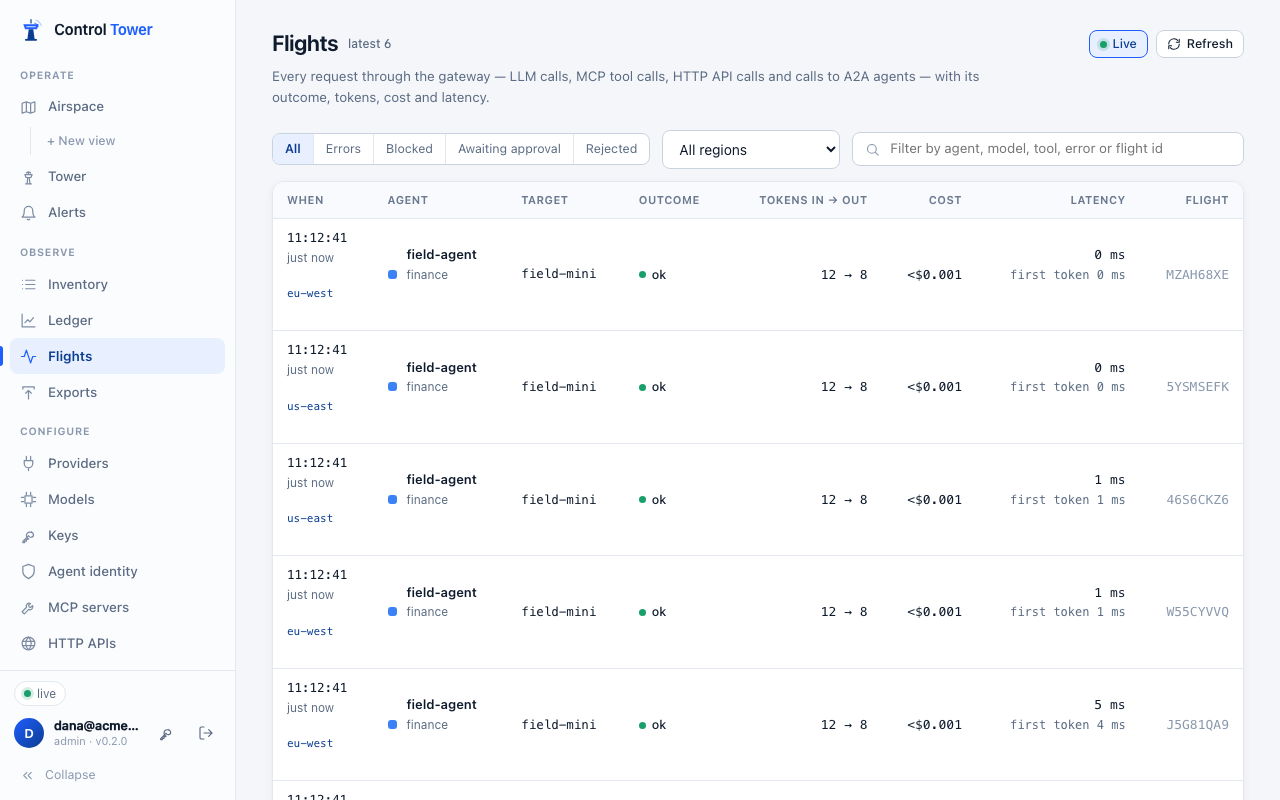
The control plane's console shows every region's traffic as well as its own:
| Page | Across regions |
|---|---|
| Flights | Every region's calls, newest first, each marked with its region. The region menu shows one region, or the control plane's own calls. Opening a call shows its events, from the region that holds it |
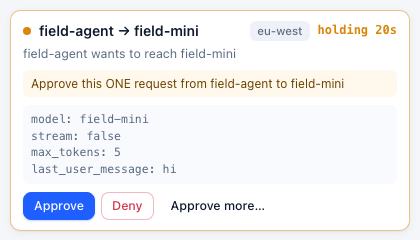
| Tower | Calls held in any region, each marked with its region. Deciding one here decides it in its region, as you (it's recorded there as decided by your name, and in the control plane's audit log). The region's own console can decide it too |
| Airspace | Every region's traffic on one map, live, including held and blocked calls as they happen |
| Ledger | Spend, tokens, calls and latency added up across regions |
| Keys | Last used counts use in any region. Retiring idle keys waits until every region has answered, so a key used only in a region is never retired |
| Flight Recorder | Replays every region's calls |
How it works:
- Nothing is stored on the control plane. When a page asks, each region answers from its own database, and the answer is shown, not kept. Live traffic works the same way: each region sends its live frames every second, and they pass straight to the consoles watching.
- Regions connect out. Each region keeps a request open to the control plane (a long poll) and answers the console's questions over it. A region behind a firewall or NAT needs no inbound access.
- Teams: someone who sees only their teams sees only their teams' calls from every region, because each region applies their scope.
- A region that doesn't answer is named, not silently missing. A page shows what it has, and says which region it couldn't include. A region that has stopped is skipped at once; one that's slow is given up on after 6 seconds.
When the control plane is out of reach
A region keeps serving on the configuration it last received: keys, gates, limits and approvals all work as they did. It keeps that configuration in its own database, so it serves even after a restart during the outage.
Changes made on the control plane meanwhile arrive when it's reachable again. Regions check every 5 seconds (CT_CONFIG_POLL_S). The region's console says it can't reach the control plane, and why.
A region that has never received any configuration serves nothing until it does.
Limits and budgets across regions
An agent's limits are the same wherever it calls from:
- Rate limits are global. A key allowed 60 requests a minute gets 60 across every region together, not 60 in each. The same goes for a model's limits (its provider's quota) and a gate's limits.
- Budgets are one total. Spend in any region counts against the same budget, and a hard budget spent in one region stops the agent in all of them. Budgets on the control plane shows the total; each region shows it too.
- The license's yearly request count includes every region. Each region reports its requests per day; License on the control plane adds them up.
Every 2 seconds, each region tells the control plane what it let through and spent, and hears back what the other regions did. Two things follow:
- A limit can be passed by a little. The regions don't hear about each other's calls until the next exchange, so for a couple of seconds each region can let through what's left. The overshoot is at most about 2 seconds of traffic from each other region.
- Calls at once (
max_parallel) is counted per region. A key allowed 5 calls at once can have 5 in each region.
When the control plane is out of reach, each region keeps limiting on its own and remembers what it spent. When the control plane is back, the region reports it and the totals catch up. If a region restarts during the outage, the spend it hadn't reported yet is lost from the total. That's at most the spend since the control plane went away.
Occasionally, a report that the control plane received but whose answer was lost is sent again. Spend is then counted twice, never missed.
A new budget starts from the spend the control plane can see in its own records. Calls made in regions before the budget was set aren't counted.
Tested across regions
It is tested on a control plane in US West with three regions:
| Region | Where | Runs on |
|---|---|---|
us-east | Virginia | 2 servers sharing their own Postgres and Redis in US East |
eu-west | Amsterdam | 1 server on SQLite |
asia-se | Singapore | 1 server on SQLite |
Agents call each region directly. What was measured:
| Result | |
|---|---|
| A key added on the control plane is served | in 1.5–6 s in every region (regions check every 5 s) |
| A key disabled on the control plane is refused | in 1.5–6 s in every region |
| The control plane's Flights, across all three regions | answers in about 0.3 s |
| A call held in Singapore | is on the control plane's Tower within about a second; approved there, the call completes within 2 s of being made |
| The live map on the control plane | shows Singapore's calls within about 1.5 s |
| 3 requests a minute for one agent | one call in each region uses it up everywhere |
| A hard budget spent in Amsterdam | is seen in Virginia and Singapore within 5 s, and stops the agent there |
And the failure drills:
- A region's token revoked: the region keeps serving on its last configuration and says why. With its new token, it's back in sync.
- A region gone: the console still answers within 0.3 s, naming the region it can't reach, and the other regions carry on. The region comes back with its calls.
- A region redeployed under steady traffic: calls keep being answered.
- The control plane gone: every region keeps serving and says it can't reach it, even a region restarted during the outage. When the control plane is back, a change made then reaches every region within seconds, and spend made during the outage is added to the budgets' totals.
What isn't there yet
Each of these is the next step, not a design choice. Until then:
- Only in each region's own console:
- the details panel of an agent-to-agent link on the map;
- spend by customer and by tag;
- the alert inbox;
- the data-flow inventory export.
- The audit log is the control plane's: changes are made there, and decisions made from its console are recorded there. A region records nothing of its own.
Environment
| Variable | On | |
|---|---|---|
CT_ROLE=region | regions | This install is a region |
CT_REGION | regions | Its name, as added on the control plane |
CT_CONTROL_PLANE_URL | regions | The control plane's URL |
CT_REGION_TOKEN | regions | How it signs in to the control plane |
CT_MASTER_KEY | regions | The region's own master key, from the control plane (not the control plane's) |
CT_CONFIG_POLL_S | regions | How often it checks for changes (default 5) |
CT_PUBLIC_URL | control plane | The URL regions reach it at |
API
On the control plane, for admins:
| Method | Path | |
|---|---|---|
| GET | /admin/api/regions | Regions with status (waiting, in_sync, behind, unreachable), last_seen, instance, version, applied_at, error |
| POST | /admin/api/regions | {name}: answers env, the settings the region starts with (shown once) |
| POST | /admin/api/regions/:id/token | A new token (the old one stops at once) |
| DELETE | /admin/api/regions/:id |
Regions call GET /cp/v1/config with their token. It answers 304 when nothing changed, or a signed snapshot. They also:
- hold
GET /cp/v1/link/nextopen for the console's questions, and answer onPOST /cp/v1/link/res; - send live frames to
POST /cp/v1/link/live; - every 2 seconds, send what they let through, what they spent and their requests per day to
POST /cp/v1/link/usage. The answer is what the other regions let through, and each budget's total.
The console's own APIs (/admin/api/flights, …/approvals, …/ledger/summary, …/topology, …/replay, …/events/recent, …/keys) include regions. Each answer has regions: {<name>: "ok" | "unreachable" | "error"}, and each flight and approval has its region (null for the control plane's own). GET /admin/api/flights?region=<name> (or here) shows one. On a region, GET /admin/api/status includes region: its name, its control plane, the configuration applied and when, the last contact, and any error.