 Control Tower
 Secret managers
Enterprise: secret managers need a Control Tower Enterprise license.
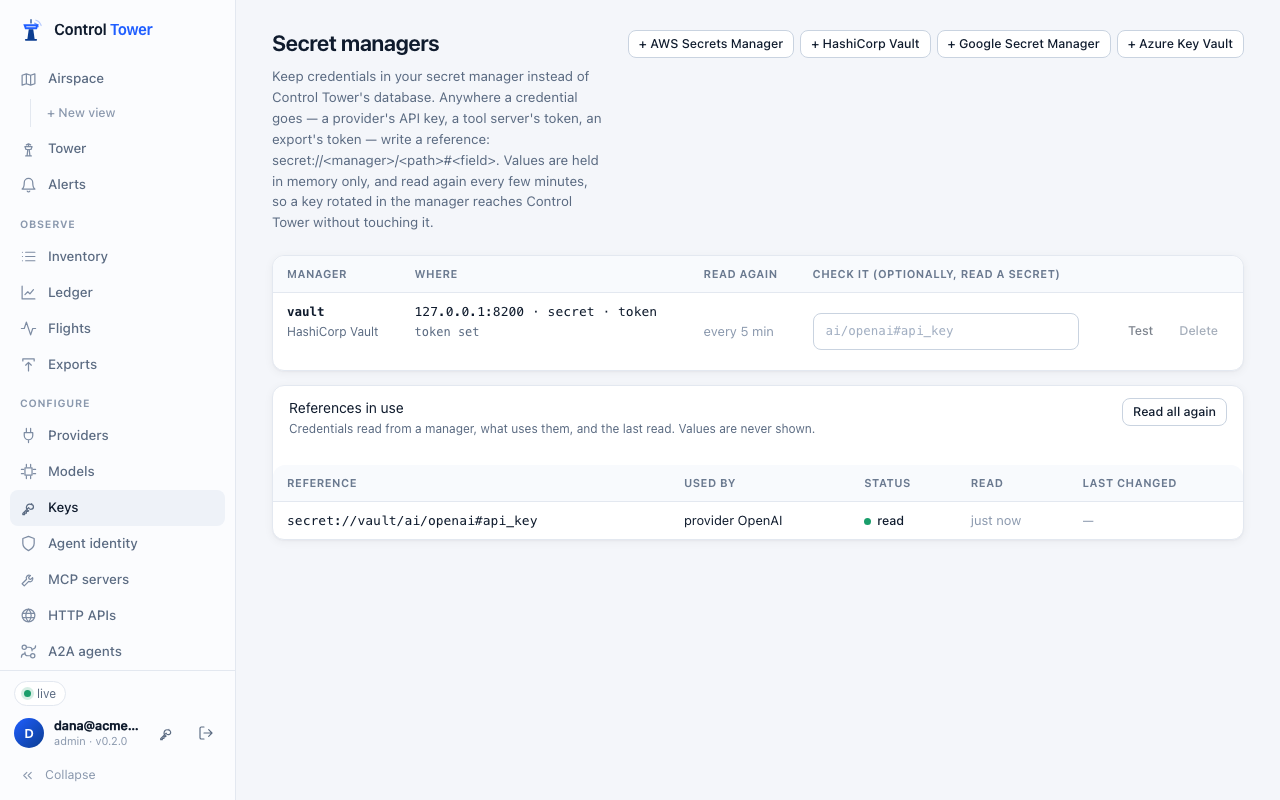
Credentials can stay in your secret manager instead of Control Tower's database. Supported managers are AWS Secrets Manager, HashiCorp Vault, Google Secret Manager and Azure Key Vault. Anywhere a credential goes, write a reference to it instead:
secret://<manager>/<path>#<field>For example:
secret://vault/ai/openai#api_key: theapi_keyfield ofai/openaiin Vault;secret://aws/prod/anthropic: the whole secretprod/anthropicin AWS.
Control Tower reads the value when it's first needed and keeps it in memory only. It reads it again every few minutes, so a key rotated in your secret manager reaches Control Tower on its own: nothing to paste, no restart.
Set it up
Open Secret managers and add yours (see each manager for the settings and permissions).
- Its name is what references use:
secret://<name>/…. - Read again every sets how often values are refreshed (300 seconds unless you choose; 30 seconds to a day).
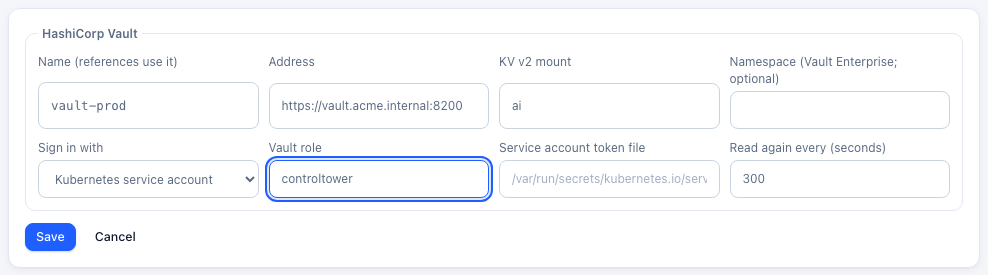
- Its name is what references use:
Test checks that Control Tower can sign in. Put a path in the box to also read that secret; its length is shown, never its value.
Put references where the credentials go:
- a provider's API key;
- an MCP server's or HTTP API's token;
- an A2A agent's credentials;
- an export's API key or HEC token;
- a guardrail service's key;
- an alert channel's webhook URL or secret.
A reference can also go in a config file:
api_key: secret://vault/ai/openai#api_key.References in use lists each reference, what uses it, when it was last read and when its value last changed.
A reference is stored as written. Editing the provider (or the tool server, export and so on) later keeps the reference, never the value read.
Which value
| The secret holds | The reference | Reads |
|---|---|---|
| A single value | secret://aws/prod/openai-key | The value |
JSON: {"api_key": "sk-…", "org": "acme"} | secret://aws/prod/openai#api_key | That field |
| JSON with one field (every Vault secret is fields) | secret://vault/ai/openai | That one field |
| JSON with several fields | secret://vault/ai/openai | Refused: name the field with #field |
A specific version: secret://gcp/openai-key/versions/7 (Google) or secret://keyvault/openai-key/<version> (Azure). Otherwise the latest version is read.
Reading and rotation
- At start, Control Tower reads every reference before it serves calls, waiting up to 15 seconds.
- Every refresh interval, each value is read again. When one has changed, what uses it reloads with the new value. Read all again does it now.
- If a read fails (the manager is down, or a permission was removed), the last value read stays in use and the error is shown under References in use. The read is tried again every 30 seconds.
- A reference never read (the manager was unreachable from the start) is sent as it is written, so the provider refuses the call as it would a wrong key.
To rotate a provider's key:
- Create the new key at the provider.
- Put it in the secret manager.
- Wait one refresh interval, or click Read all again, then check Last changed.
- Revoke the old key at the provider.
Control Tower's own agent keys rotate too, and can be written into your secret manager for agents to read: see Key rotation.
Each manager
AWS Secrets Manager
| Setting | |
|---|---|
| Region | e.g. us-east-1 |
| Access key | Optional. Without one, Control Tower uses the role it runs with, in the AWS SDKs' order: environment variables, EKS web identity (IRSA), the ECS task role, then the EC2 instance role |
| Endpoint | Optional: a VPC endpoint |
The path is the secret's name or ARN. Permissions:
{
  "Version": "2012-10-17",
  "Statement": [
    { "Effect": "Allow", "Action": ["secretsmanager:GetSecretValue"], "Resource": "arn:aws:secretsmanager:us-east-1:123456789012:secret:prod/ai/*" },
    { "Effect": "Allow", "Action": ["secretsmanager:PutSecretValue"], "Resource": "arn:aws:secretsmanager:us-east-1:123456789012:secret:agents/*" },
    { "Effect": "Allow", "Action": ["secretsmanager:ListSecrets"], "Resource": "*" }
  ]
}
PutSecretValue is only needed to deliver rotated keys. ListSecrets is only needed for Test.
HashiCorp Vault
| Setting | |
|---|---|
| Address | e.g. https://vault.acme.internal:8200 |
| KV v2 mount | secret unless you choose another |
| Namespace | Vault Enterprise namespaces |
| Sign in with | A token, AppRole (role ID and secret ID), or a Kubernetes service account (the Vault role; the token file defaults to the pod's own) |
The path is the secret's path inside the mount (ai/openai, not secret/data/ai/openai). A policy:
path "secret/data/ai/*"     { capabilities = ["read"] }
path "secret/data/agents/*" { capabilities = ["read", "create", "update"] } # delivering rotated keysGoogle Secret Manager
| Setting | |
|---|---|
| Project | e.g. acme-prod |
| Service account key | Optional. Without one, Control Tower uses the service account it runs as (GKE Workload Identity, Cloud Run, Compute Engine) |
The path is the secret's name, optionally /versions/<n>. Roles:
- Secret Manager Secret Accessor on the secrets read;
- Secret Manager Secret Version Adder on those it delivers rotated keys to;
- Secret Manager Viewer for Test.
Azure Key Vault
| Setting | |
|---|---|
| Vault URL | e.g. https://acme.vault.azure.net |
| Tenant, client ID, client secret | An app registration. Without a client secret, Control Tower uses its managed identity: App Service, Container Apps or Arc through IDENTITY_ENDPOINT, otherwise the VM's; a client ID picks a user-assigned identity |
The path is the secret's name, optionally /<version>. Roles:
- Key Vault Secrets User to read;
- Key Vault Secrets Officer on the secrets it delivers rotated keys to.
What's stored where
- The manager's own credentials (a Vault token, an AWS key, a client secret) are encrypted with Control Tower's master key and never shown again. With a role or managed identity, there are none to store.
- Values read are held in memory only, and are never shown in the console, logs, exports, the audit log or the support bundle.
- Changes to managers are in the audit log.
Without a license (or once one ends), managers can't be added or changed. References already set up keep being read, so calls never stop because of the license.
API
Admins only.
| Method | Path | |
|---|---|---|
| GET | /admin/api/secret-managers | Managers (settings without their secrets) and refs: each reference in use, what uses it, status (ok, error, reading), error, read_at, changed_at |
| POST | /admin/api/secret-managers | {name, kind: aws | vault | gcp | azure, config, refresh_s} |
| PATCH | /admin/api/secret-managers/:id | config (secrets left empty keep their values) or refresh_s |
| DELETE | /admin/api/secret-managers/:id | Refused (409) while references use it, unless ?force=true |
| POST | /admin/api/secret-managers/:id/test | Sign in; with {ref}, also read it. {ok, message}, never the value |
| POST | /admin/api/secret-managers/refresh | Read every reference again now |
config by kind:
kind | config |
|---|---|
aws | region (required), access_key_id, secret_access_key, session_token, endpoint, sts_endpoint |
vault | address (required), mount, namespace, auth (token, approle, kubernetes), token, role_id, secret_id, role, jwt_path, auth_mount |
gcp | project (required), service_account_json, api_url |
azure | vault_url (required), tenant_id, client_id, client_secret, authority |