 Control Tower
 MCP tool servers
Tool calls are where agents act — create a ticket, merge a pull request, delete a contact. Register your MCP servers with Control Tower and every tool call is mapped, gated, held for approval or inspected like a model call.
Register a server
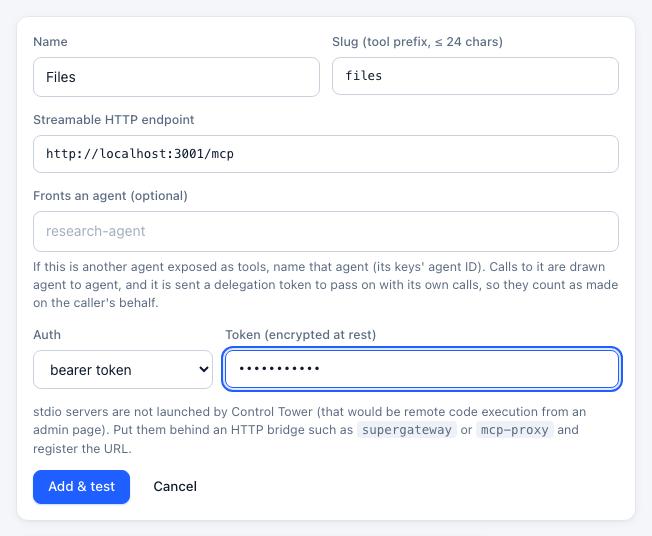
MCP servers → Add server: a name, a slug (the tool prefix), the server's Streamable HTTP endpoint, and its credentials if it needs them (stored encrypted; agents never see them).
Control Tower connects, lists the tools and classifies each one: read (from readOnlyHint or a name like get_, list_, search_), write, or destructive (from destructiveHint or a name like delete_, merge_, transfer_). Gates can target those classes.
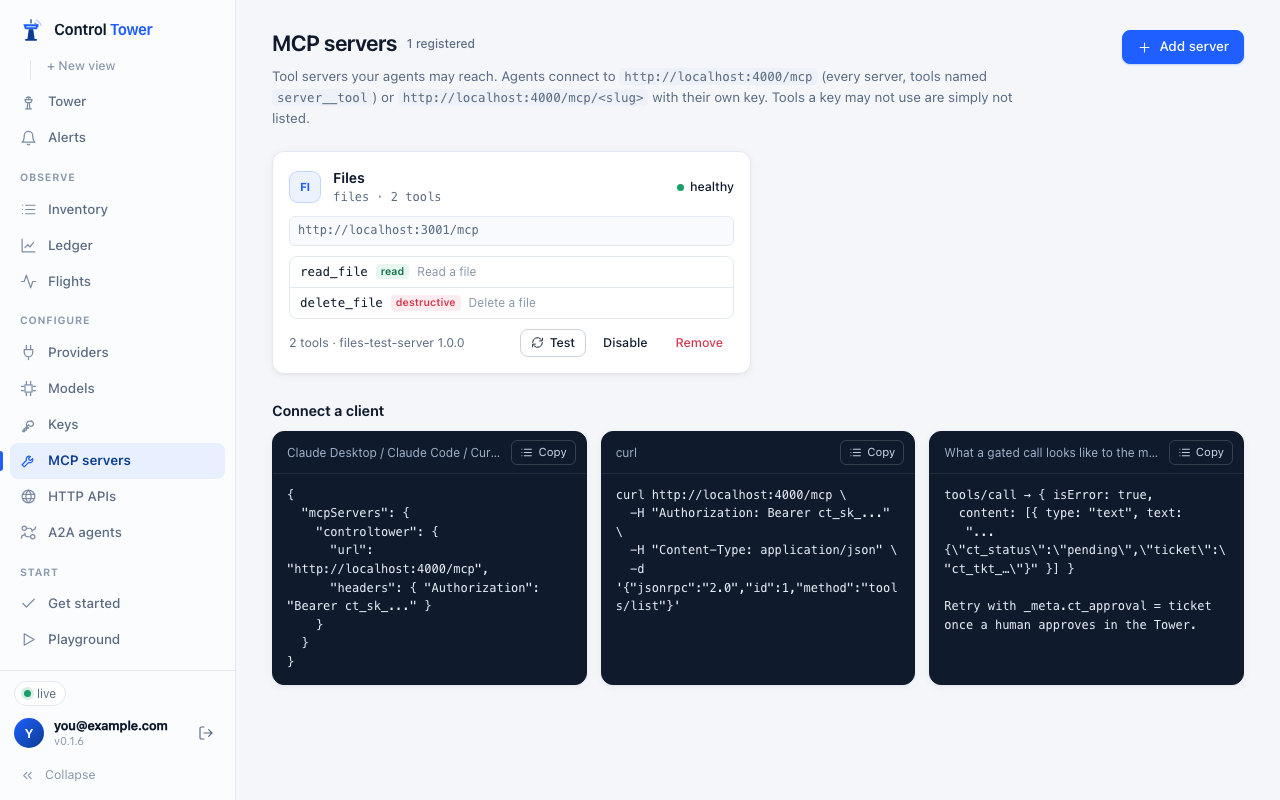
Servers are health-checked, and their tool lists are refreshed so new tools appear on the map. The transport is Streamable HTTP. For a stdio-only server, run it behind a small bridge such as supergateway and register the bridge's URL — Control Tower does not start local commands.
Each agent gets its own session with each upstream server, so a stateful server never shows one agent what another left in its session (a login, an open document, a cursor). Keys that share an agent ID share a session. An unused session is closed after 30 minutes, and at most 2,000 are kept open, the least recently used closing first.
Connect clients
Agents connect to one address with their own key:
http://<host>:4000/mcp— every server, tools namedserver__tool(github__merge_pr).http://<host>:4000/mcp/<slug>— one server, original tool names.
Client setup for Claude Code, Cursor and the OpenAI Agents SDK is in Connect your agents.
Who sees which tools
tools/list is filtered per key before the agent sees anything:
- the key's
allowed_mcpglobs (e.g.salesforce__search_*), - then gates that block a tool for this agent regardless of arguments.
A tool an agent can't see is one it can't call and doesn't need approval for — this is the strongest control Control Tower has, stronger than blocking calls after the fact. Gates that depend on arguments leave the tool visible and decide at call time.
Gates on tools
Everything in the Airspace applies: drag from an agent to a server or a single tool row to block it, require approval or inspect it. On a tool call:
- Blocked — the agent gets a tool result with
isError: trueand the reason, so the model can explain it instead of retrying blindly. - Held — the call waits for a human; the card shows the tool's actual arguments. Unanswered, the result's JSON carries
ct_status: "pending"and aticket. Once someone approves, repeat the same call with the ticket inparams._meta.ct_approval(or thex-ct-approvalHTTP header); it goes through once. A retry before anyone decides getspendingagain, withretry_after_ms. See Retrying with a ticket. - Inspected — arguments and results are scanned. Scanning tool results is where indirect prompt injection and data leaks are caught before the model reads them: mask an email address in a CRM record, block instructions hidden in a web page.
Resources and prompts
On a single server's endpoint (/mcp/<slug>), agents can also list and read the server's resources and get its prompts. Reading a resource and getting a prompt are flights like tool calls — recorded, gated and inspected — named <slug>__resources/read and <slug>__prompts/get, with the URI or prompt name and arguments as their arguments:
- A key's
allowed_mcpmust cover them (docs__*does;docs__searchalone doesn't): otherwise the lists come back empty and reads are refused. - A gate on
docs__resources/readblocks, holds or inspects reads — an inspect gate on the output is where instructions hidden in documents are caught. Match a single resource with an argument constraint onuri. - A refused read or prompt comes back as a JSON-RPC error with the reason.
- A server that fronts an agent is sent a delegation token with them too.
In the config file
mcp_servers entries in a config file (URL, auth_type, auth_value, static_headers) become MCP servers, both with Import config and with --config. See Config file.