 Control Tower
 Enforcing the gateway on every computer
Enterprise: this page builds on Laptops, which needs a Control Tower Enterprise license.
Laptops covers rolling Claude Code, Claude Desktop and Codex out and signing people in. This page covers making sure it holds:
- every one of those tools, on every managed computer, uses Control Tower and nothing else;
- people can't switch that off;
- you can check that it's so, and find the computers where it isn't.
Enforcement has four layers. Use all four: each covers what the one before it can't.
| Layer | What it stops | Where it's set |
|---|---|---|
| 1. The tools' managed settings | Claude Code, Claude Desktop and Codex using another provider, another endpoint or another MCP server | Your MDM (Jamf, Intune, Kandji, Group Policy) |
| 2. Sign-in | Calls nobody can be held to account for; keys copied between people | Control Tower, or your identity provider |
| 3. The network | Every other way to reach a model provider: other tools, browser apps, scripts | Your firewall, proxy or secure web gateway |
| 4. Checking | Computers the rollout missed, or that drifted | Your MDM, and Control Tower's records |
1. Managed settings: what each tool enforces
Each vendor reads a managed configuration that IT controls and the person can't override: a configuration profile on macOS, machine policy in the Windows registry, or a system file. The rollout files from Laptops write these. With Lock down on, they also refuse everything else.
Claude Code
| Setting | Effect | Can the person get around it? |
|---|---|---|
env.ANTHROPIC_BASE_URL = Control Tower | Every model call goes to Control Tower | No. A managed value wins over shell exports, ~/.claude/settings.json, project settings and --settings |
allowedProviders: ["customEndpoint"] (Lock down) | Claude Code refuses to start against any other destination, including Anthropic directly, and accepts ANTHROPIC_BASE_URL only with the managed value | No, on Claude Code 2.1.285 or later. Earlier versions ignore it: see requiredMinimumVersion below |
apiKeyHelper = ct-auth | The credential comes from the person's sign-in | No. The managed helper is the only one read |
managed-mcp.json (a file) | Claude Code loads exactly Control Tower's MCP endpoint. User, project and plugin MCP servers and --mcp-config are refused | No |
allowManagedMcpServersOnly + allowedMcpServers (Lock down) | Only servers at Control Tower's address, wherever they're configured | No |
Add these yourself to the profile or managed-settings.json when you need them:
requiredMinimumVersion: stops an older Claude Code, one that predatesallowedProviders, from starting at all.CLAUDE_CODE_SKIP_FAST_MODE_NETWORK_ERRORS(inenv): needed if you use fast mode and blockapi.anthropic.comat the network (layer 3), because fast mode's availability check goes there directly.- Don't set
forceLoginMethodorforceLoginOrgUUID. Either one blocksapiKeyHelper, and Claude Code then won't start.
Where the settings are read from:
- macOS: the configuration profile (preference domain
com.anthropic.claudecode), re-checked every 30 minutes. - Windows:
HKLM\SOFTWARE\Policies\ClaudeCode, valueSettings, re-checked every 30 minutes. - Linux:
/etc/claude-code/managed-settings.json, reloaded when it changes. managed-mcp.jsonsits in the same system folder:/Library/Application Support/ClaudeCode/,C:\Program Files\ClaudeCode\or/etc/claude-code/.
Claude Desktop
| Setting | Effect | Can the person get around it? |
|---|---|---|
inferenceProvider: gateway + inferenceGatewayBaseUrl | Chat, Cowork and Code sessions use Control Tower | No. When a managed source is present it wins, and settings made in the app are ignored |
inferenceCredentialHelper = ct-auth | The credential comes from the person's sign-in | No |
managedMcpServers | Control Tower's MCP endpoint is provided | Not with Lock down: see the next row |
isLocalDevMcpEnabled: false, isDesktopExtensionEnabled: false (Lock down) | No user-added local MCP servers or desktop extensions | No |
Claude Desktop reads its configuration when it starts, and re-checks it every 10 minutes. For most changes it asks the person to restart, and requires the restart within 24 hours (relaunchEnforcementHours).
Where the settings are read from:
- macOS: preference domain
com.anthropic.claudefordesktop. - Windows:
HKLM\SOFTWARE\Policies\Claude. When machine policy is present there, the user hive (HKCU) is ignored. - Linux:
/etc/claude-desktop/managed-settings.json.
Codex (CLI, IDE extension, app)
| Setting | Effect | Can the person get around it? |
|---|---|---|
requirements.toml: model_provider = "controltower" and its [model_providers.controltower] | Codex uses Control Tower's provider, overriding local and session configuration | No. A conflicting local value falls back to the required one, and Codex says so |
[model_providers.controltower.auth] = ct-auth | The credential comes from the person's sign-in | No |
[mcp_servers.controltower.identity] (Lock down) | Only an MCP server with that name and URL can be enabled | No |
managed_config.toml (macOS: the profile's config_toml_base64; Linux: /etc/codex/) | Control Tower's MCP endpoint, set up | It's re-applied at each start. People can change it during a run; the requirement above still applies |
Windows: each person's ~\.codex\config.toml | Codex on Windows has no system-wide defaults file, so the install script adds Control Tower's MCP server to each profile's own file, only where it's missing (and to the Default profile, for people who sign in later) | They can edit their own file; with Lock down, requirements.toml still enables only Control Tower's server |
Where the settings are read from:
- macOS: preference domain
com.openai.codex, keysrequirements_toml_base64andconfig_toml_base64. - Linux and macOS without a profile:
/etc/codex/requirements.toml. - Windows:
%ProgramData%\OpenAI\Codex\requirements.toml.
Tools that can't be enforced this way
- Cursor: its MDM policies have no gateway setting.
- GitHub Copilot CLI: Laptops points it at Control Tower with each person's sign-in, but only through environment variables (it has no managed settings for its model provider), which someone can unset in their own shell.
- VS Code with GitHub Copilot Chat: Control Tower's models can be added (GitHub Copilot), but GitHub-hosted models stay in the picker unless your Copilot policies turn them off.
- Anything else a person installs or writes.
For all of these, use the network (layer 3).
2. Sign-in: everyone as themselves
Calls are made as a key you choose, and recorded as the person. There are two ways to sign people in, chosen under Laptops › Roll it out › How people sign in.
| With Control Tower | With your identity provider | |
|---|---|---|
| What people do | Approve their computer once in Control Tower's console (after its single sign-on) | Sign in to Okta, Entra ID… once, with the device code the tool shows |
| Control Tower account needed | Yes: the member role, which sees only their teams | No |
| Seats | Each person signing in with single sign-on uses one | Each person seen in the last 30 days uses one, once the issuer is marked as people (Laptops offers to) |
| What picks the key | Laptops rules: tool × team → key | The trusted issuer's rules under Agent identity: claims such as groups → key |
| Calls recorded as | The person's email | The token's email (or preferred_username for Entra ID) |
| Ending access | Signing out a computer, or removing the person, refuses their token at once | Disable the person at the identity provider: their tokens stop being renewed, and the last one expires within its lifetime (usually an hour) |
| Token | Control Tower's own (an hour), from a refresh token in the keychain | The identity provider's ID token, from its refresh token in the keychain |
Signing in with your identity provider
Register an app for laptops at your identity provider. It's a public client: no secret, because it runs on people's computers.
- Okta: a Native app with the Device Authorization and Refresh Token grants. Use your authorization server's issuer, for example
https://acme.okta.com/oauth2/default, and add agroupsclaim to its ID tokens. - Microsoft Entra ID: an app registration with Allow public client flows turned on. The issuer is
https://login.microsoftonline.com/<tenant-id>/v2.0. Addgroupsunder Token configuration to put group IDs in the ID token. - Others: any OpenID Connect provider that offers the device authorization grant (RFC 8628) and refresh tokens.
- Okta: a Native app with the Device Authorization and Refresh Token grants. Use your authorization server's issuer, for example
Trust it in Control Tower. Under Agent identity, add the issuer:
- Accepted audiences: the app's client ID (an ID token's
aud). - Who presented it:
email, orpreferred_usernamefor Entra ID. - Rules from groups to keys: for example,
groupsmatchingengineering→claude-code-engineering. - The token lifetime limit (24 hours by default) is above the identity provider's.
- Its tokens are people: on, so each person uses a seat (see people or workloads).
- Accepted audiences: the app's client ID (an ID token's
Choose it under Laptops › Roll it out: pick the issuer and enter the client ID. The rollout files then configure ct-auth with it (
idp_issuer=,idp_client_id=).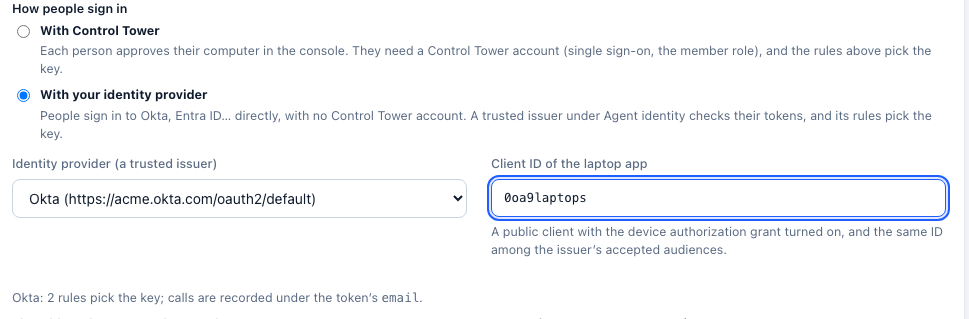
Try it:
ct-auth login --client claude-codeopens the identity provider's device page, andct-auth statusshows who you are.
3. The network: close every other way out
Managed settings only govern the tools that read them. To make Control Tower the only way to a model provider, let only Control Tower reach the providers' APIs.
At your firewall, proxy or secure web gateway (Zscaler, Netskope, Palo Alto and the like), allow these hosts from Control Tower's outbound addresses only, and block them for everything else:
| Provider | Hosts |
|---|---|
| Anthropic | api.anthropic.com |
| OpenAI | api.openai.com |
generativelanguage.googleapis.com, *-aiplatform.googleapis.com | |
| Azure OpenAI | *.openai.azure.com, *.services.ai.azure.com |
| AWS Bedrock | bedrock-runtime.*.amazonaws.com |
| Others you use | Mistral, Groq, Together, DeepSeek, xAI, OpenRouter… |
Keep claude.ai, chatgpt.com and the consumer apps' sign-in hosts open or closed according to your own policy: Claude Desktop and Codex configured for Control Tower don't need them for model calls.
Then whatever reaches a provider does so through Control Tower: your gates apply, and the call is on the map. Any attempt to go direct fails at the network.
4. Checking it holds
On a computer:
- Claude Code:
/statuslists the setting sources. "Managed settings" must be among them. If a session asks the person to log in, the credential (ct-auth) didn't reach it. - Codex: the summary it prints at start shows the provider (
controltower) and its address. - Claude Desktop: on macOS,
/Library/Managed Preferences/<user>/com.anthropic.claudefordesktop.plistexists (or/Library/Managed Preferences/com.anthropic.claudefordesktop.plistfor a device-wide profile); on Windows, the values underHKLM\SOFTWARE\Policies\Claude. - The helper:
ct-auth status --client claude-codesays who the computer is signed in as.
Across the fleet, from your MDM: report what each computer has. For example, as a Jamf extension attribute (macOS):
#!/bin/sh
# Control Tower rollout: ct-auth installed, Claude Code's managed MCP file and profile present.
ok=""
[ -x /usr/local/bin/ct-auth ] && ok="ct-auth"
[ -f "/Library/Application Support/ClaudeCode/managed-mcp.json" ] && ok="$ok mcp"
[ -f /Library/Managed\ Preferences/com.anthropic.claudecode.plist ] && ok="$ok profile"
echo "<result>${ok:-none}</result>"
Build a smart group (or an Intune compliance policy) on it. Computers missing any part get the policy again.
In Control Tower:
- Laptops lists every signed-in computer, with its person, tool, key and when it was last used (signing in with Control Tower).
- The Ledger's Spend by person, and Flights filtered by person, show who is using the tools through the gateway (either way of signing in).
- Agent identity shows how many identity-provider tokens were accepted and refused, and why the last one was refused.
- Finding gaps: compare the people in your engineering group, or your MDM's computer list, with Spend by person over the last week. Someone who has the tools but never appears either doesn't use them, or reaches a provider another way. Layer 3 closes that.
What this doesn't cover
- Personal and unmanaged computers. MDM only reaches managed ones. The network layer still applies on your network or VPN, but not on someone's home network without your VPN or secure web gateway.
- A person with administrator rights on their computer can remove a profile or edit system files. Remove local administrator rights, or rely on the network layer, for people where that matters.
- Tokens already issued stay valid until they expire. With Control Tower sign-in, signing out applies at once; with an identity provider, within the token's lifetime.
See also what is enforced, and Laptops for the rollout itself.